It lives in my menu bar. I hit record, and when the meeting ends there is a structured note — summary, decisions, action items with owners — filed in the right folder in Azure Blob Storage. I had never written a line of Swift when I started.
In short
- Running Whisper locally is the decision that makes the whole thing free and private. Everything else follows from it.
- macOS still has no loopback input device, but ScreenCaptureKit captures system audio natively — no virtual driver, no aggregate device.
- The folder classifier deliberately uses no model at all, and it is the part that improves with use.
- Both bugs that cost me real time produced a plausible-looking result instead of an error.
What actually leaves the laptop#
Every transcription tool I tried wanted the audio. Not the text — the audio, on their storage, under their retention policy. For a call where someone says a client name and a number, that is a decision I would rather make myself.
So the rule I built to was simple: the recording stays here. That held. But when I drew the boundary properly, rather than the version I had in my head, I had to admit that three things do cross it.
The actual trust boundary
The audio never leaves this Mac. Three other things do — and pretending otherwise would be the kind of privacy claim that gets repeated by someone who did not check.
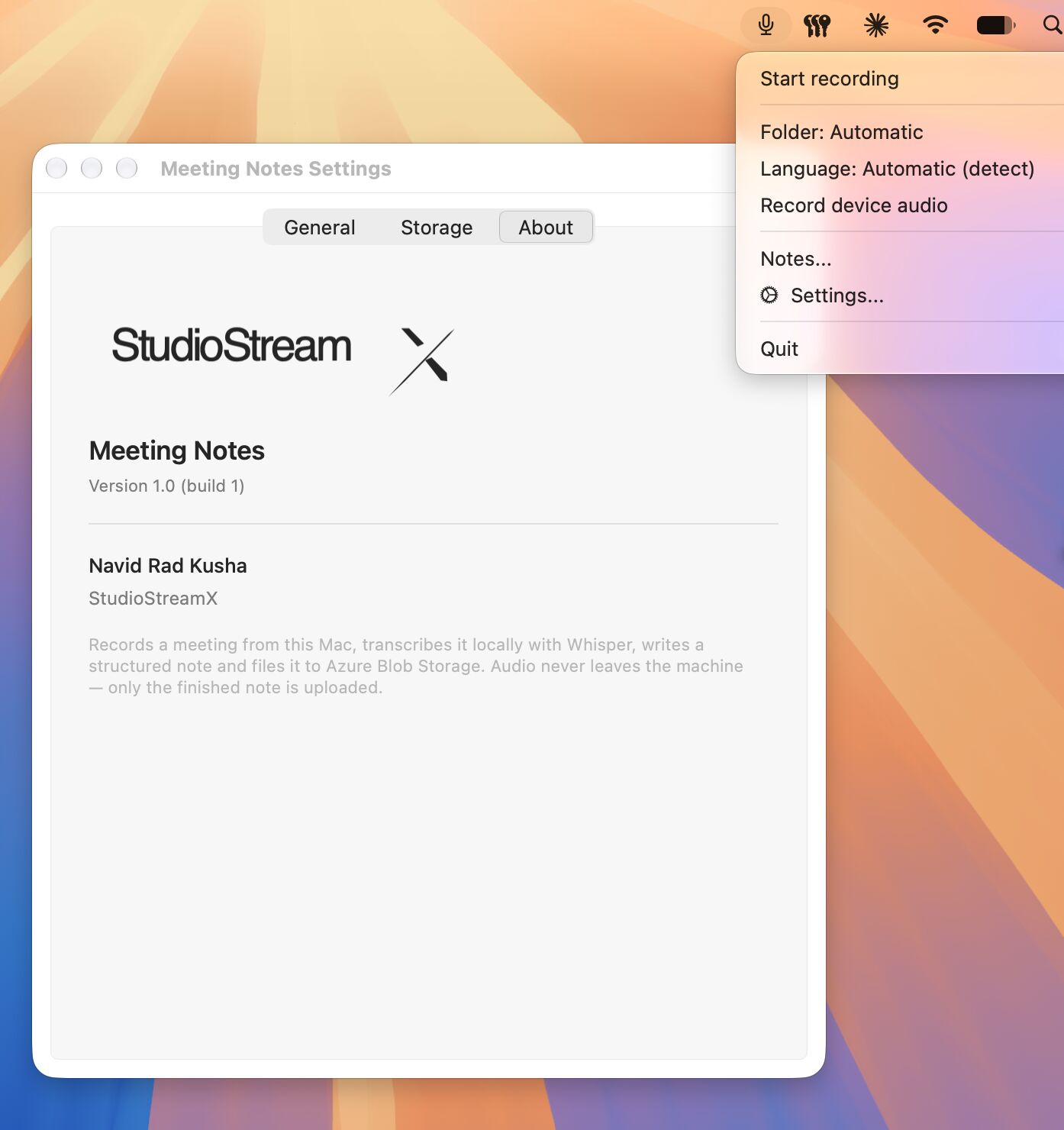
The audio never leaves. The transcript does — it goes to Claude to be turned into a note, which is the entire reason the note is any good. The finished note and the classifier’s memory both go to blob. That is a much better position than uploading the recording, and it is not the same as “nothing leaves”, so I stopped saying that. The About panel in the screenshot above still says the old version. It is on the list.
Recording the other side of the call#
The microphone is the easy half. AVAudioRecorder, a few lines, done.
The other side of the call is the half that stops most people. macOS has no loopback input device — there is no “what the speakers are playing” you can point a recorder at. The usual answer is to install a virtual audio driver and then hand-build an aggregate device in Audio MIDI Setup so the driver and the microphone appear as one input. It works. It also leaves a system extension on the machine and an audio setup that surprises you in six months, when a call has no sound and you have long forgotten why.
ScreenCaptureKit does this natively
The decision that makes it free#
Whisper large-v3, running locally through whisper.cpp with Metal acceleration on Apple Silicon. That one line is the whole economic argument: no API, no per-minute billing, no upload. A one-hour meeting transcribes in roughly eight minutes, on the laptop, while I do something else.
Worth being clear about what that costs, because eight minutes is not real time. If you need the note the moment the call ends, pay someone for a streaming API — this design cannot give you that. I do not need it. I need the note before I next think about the meeting, and eight minutes is comfortably inside that window.
A note with no API key in it#
Claude turns the raw transcript into the structured note, through the Claude Code CLI on the subscription I already pay for. The practical consequence is that there is no API key anywhere in the app: nothing to store, nothing to rotate, nothing to leak into a crash log or a screenshot.
The trade is that the app is bound to a CLI on my machine rather than to a service. That is the right shape for one person on one laptop and the wrong shape for a team, and I would rather have the version that is honest about being a personal tool.
The Azure half is conventional: Blob Storage, authenticated with an Entra service principal, client secret in the macOS Keychain rather than a config file.
The part with deliberately no AI in it#
Notes sort themselves into folders. This is the part everyone assumes is a model call, and it is the one place I deliberately did not use one.
It is a small local classifier that matches vocabulary from the transcript against a memory it builds from every note I have filed. It is seeded by folder-name matching, so it works on the very first recording, before there is any memory to match against. The memory syncs to blob, so it outlives the laptop.
- It is instant, where a model call would add seconds to every recording.
- It is free, which matters for something that runs after every meeting.
- It is deterministic — the same transcript files the same way twice.
- I can read why it chose a folder, which is the one thing I actually wanted when it got a note wrong.
The part that improves is the part with no model in it
The interesting problems were boring#
The hard parts were not the AI parts. They were a language setting and a missing directory on a search path.
A silent language bug. Whisper pins one language per file. My config forced Dutch, and large-v3 obeys that far more literally than the smaller models do — so an English meeting came back as a fluent, clean, entirely wrong Dutch translation. Nothing in the output signalled it. A transcript that looks like a transcript is the worst possible failure mode, because the next step in the pipeline has no way to notice either. The fix was to choose the language per recording rather than globally, which is the Language: Automatic (detect) line in the screenshot.
A PATH bug wearing a decode error’s clothes. Transcription started failing with ffmpeg could not decode. The audio file was fine — it played, it had the right duration, it opened in everything I tried.
# in my shell, ffmpeg is exactly where you'd expect
$which ffmpeg
/opt/homebrew/bin/ffmpeg
# the environment the launchd agent actually runs in
$launchctl getenv PATH
# …nothing. Not a short PATH — no PATH at all.
The launchd agent runs with a minimal PATH that has never heard of Homebrew, so ffmpeg was not broken and not missing — it was unfindable. And the script reported any non-zero exit as a decode failure, which is what sent me to stare at a perfectly good audio file for an hour.
| What it looked like | What it actually was | What I changed |
|---|---|---|
| A clean Dutch transcript of an English call | Language pinned globally in config; large-v3 obeys it literally | Language chosen per recording, detection by default |
| ffmpeg could not decode the file | launchd's minimal PATH excludes /opt/homebrew/bin | Absolute path to the binary, and report the real exit code |
What I’d do differently#
Both bugs have the same shape: a failure that produced a plausible-looking result instead of an error. That is what cost the time — not the difficulty, but the confidence. I would build the error paths before the features next time, and I would treat any message that names a specific cause with suspicion until the script has earned the right to be that specific.
The other surprise was how far this got. I expected a rough prototype and have a signed .app bundle, a menu bar item, native settings and a notes library with audio playback — from someone who had not written Swift before. The model wrote most of the Swift. It could not have told me the PATH was wrong, because that only shows up when the thing actually runs on a real machine after a real meeting.
Both bugs are the kind you only find by using your own tool on real recordings.